Plugable USB-C Portable Monitor with Protective Case/Stand, 100W Pass-Through Charging
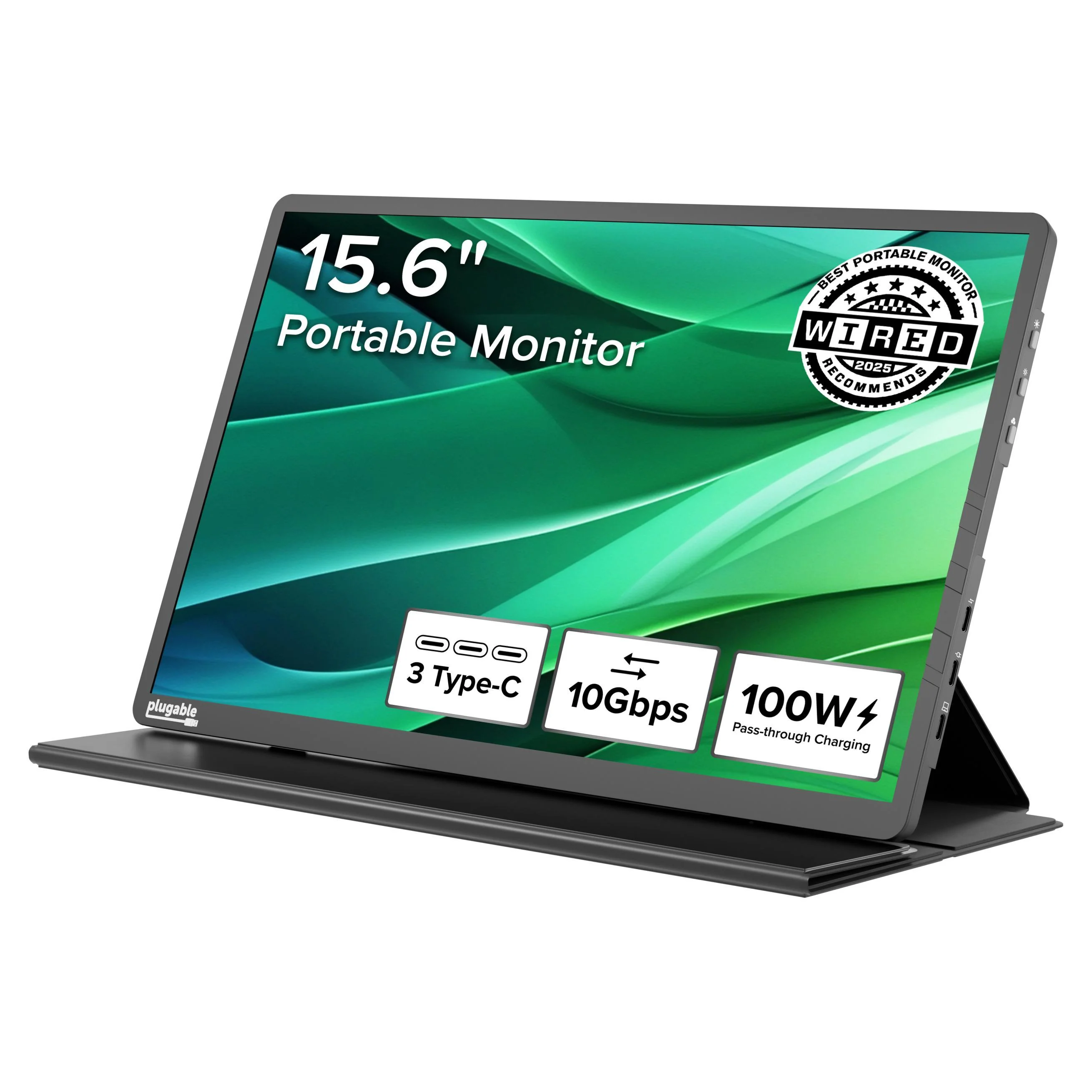
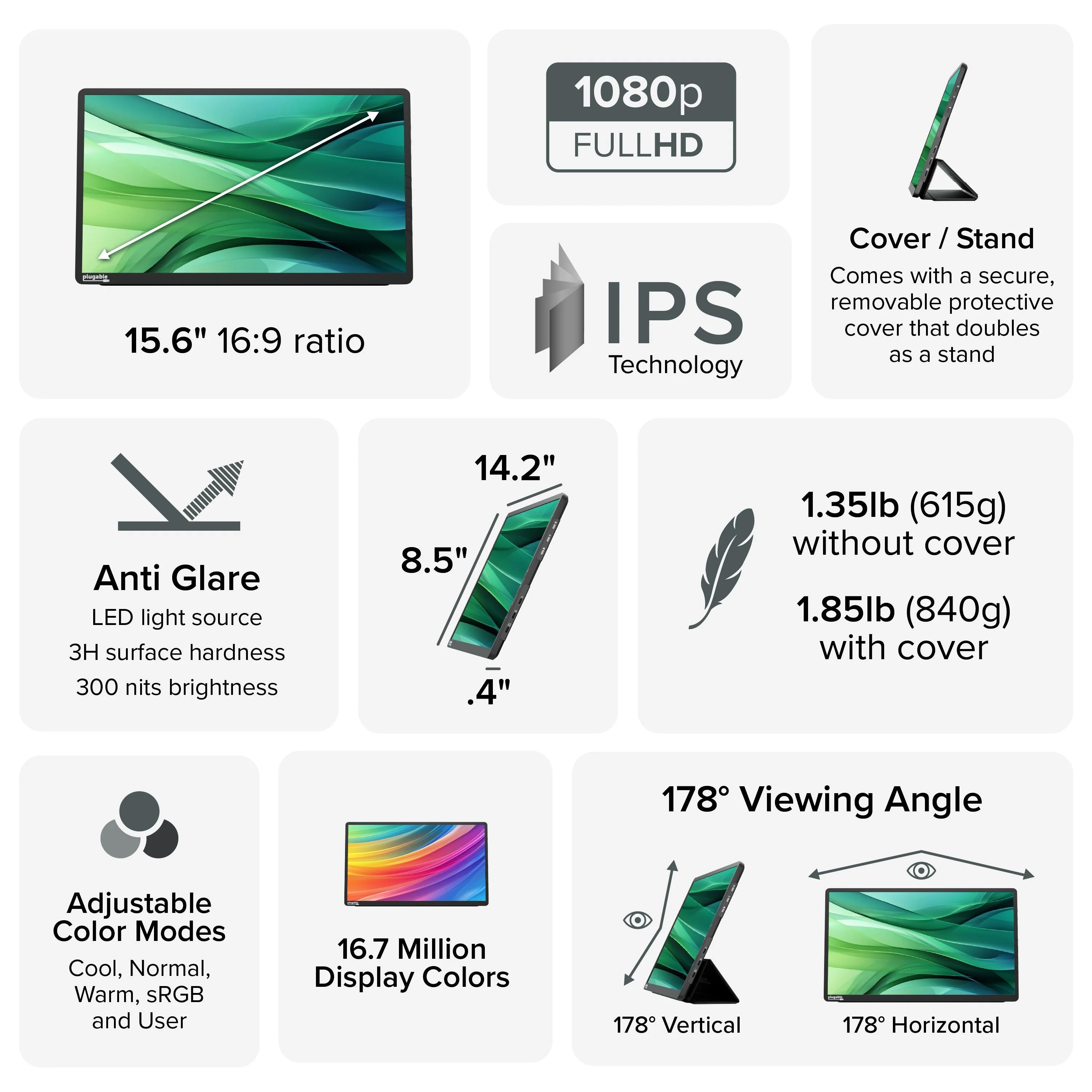
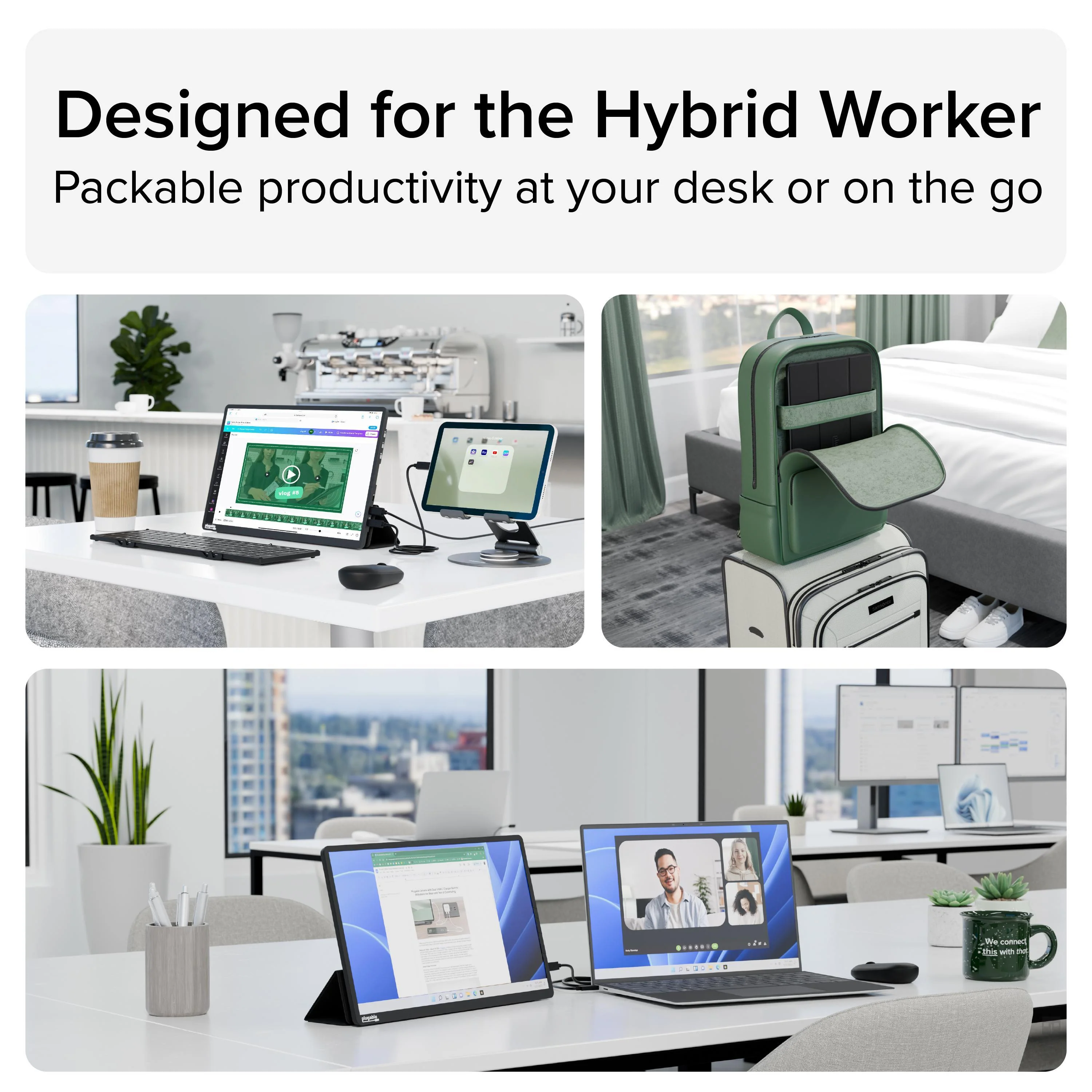
The Plugable USBC-PDMON is a TAA-compliant USB-C portable monitor designed for everyday productivity in home offices, business travel, hot-desking, classrooms, and IT deployments. It’s built to add a second screen quickly without complicated setup so you can stay productive with email, spreadsheets, admin dashboards, presentations, and remote work anywhere
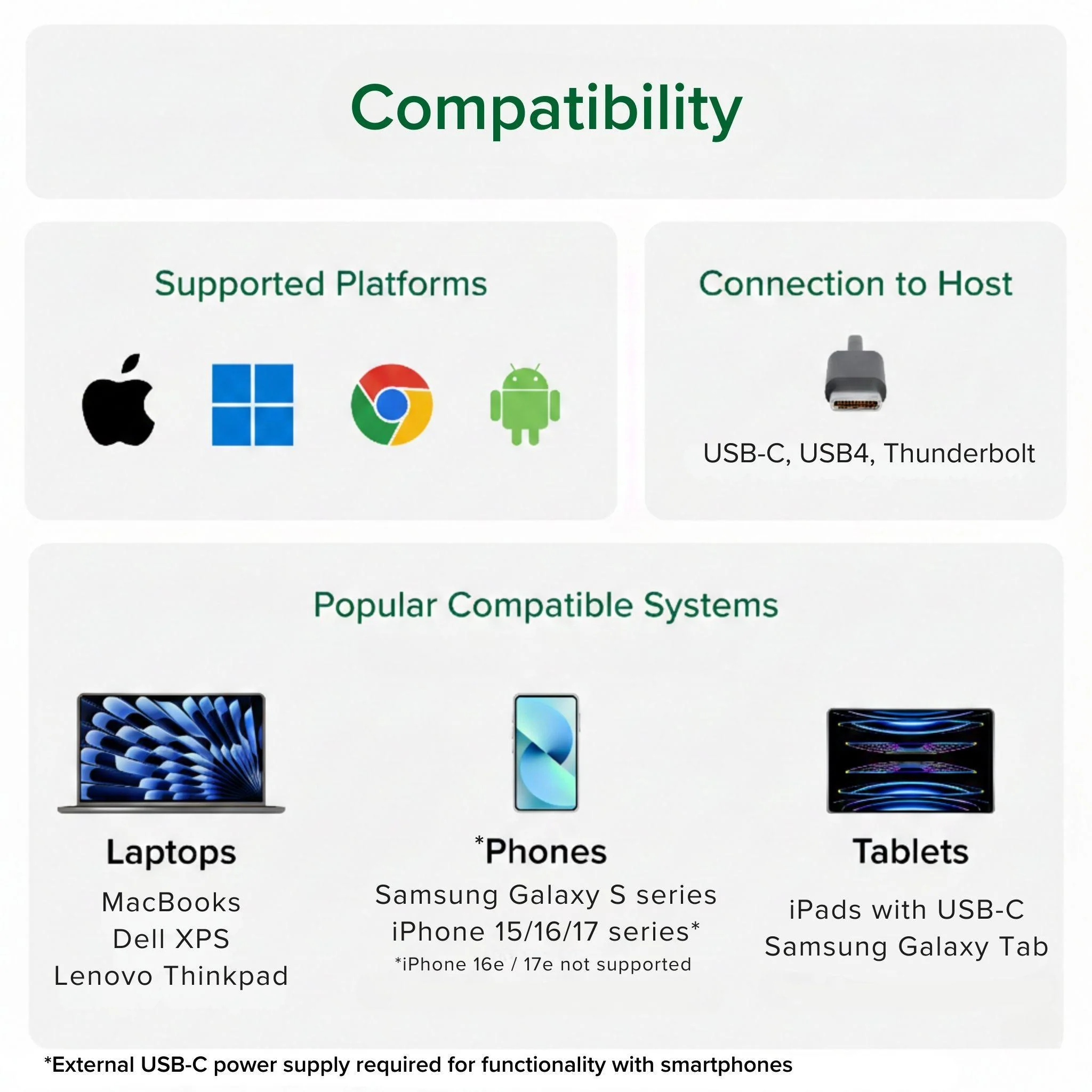
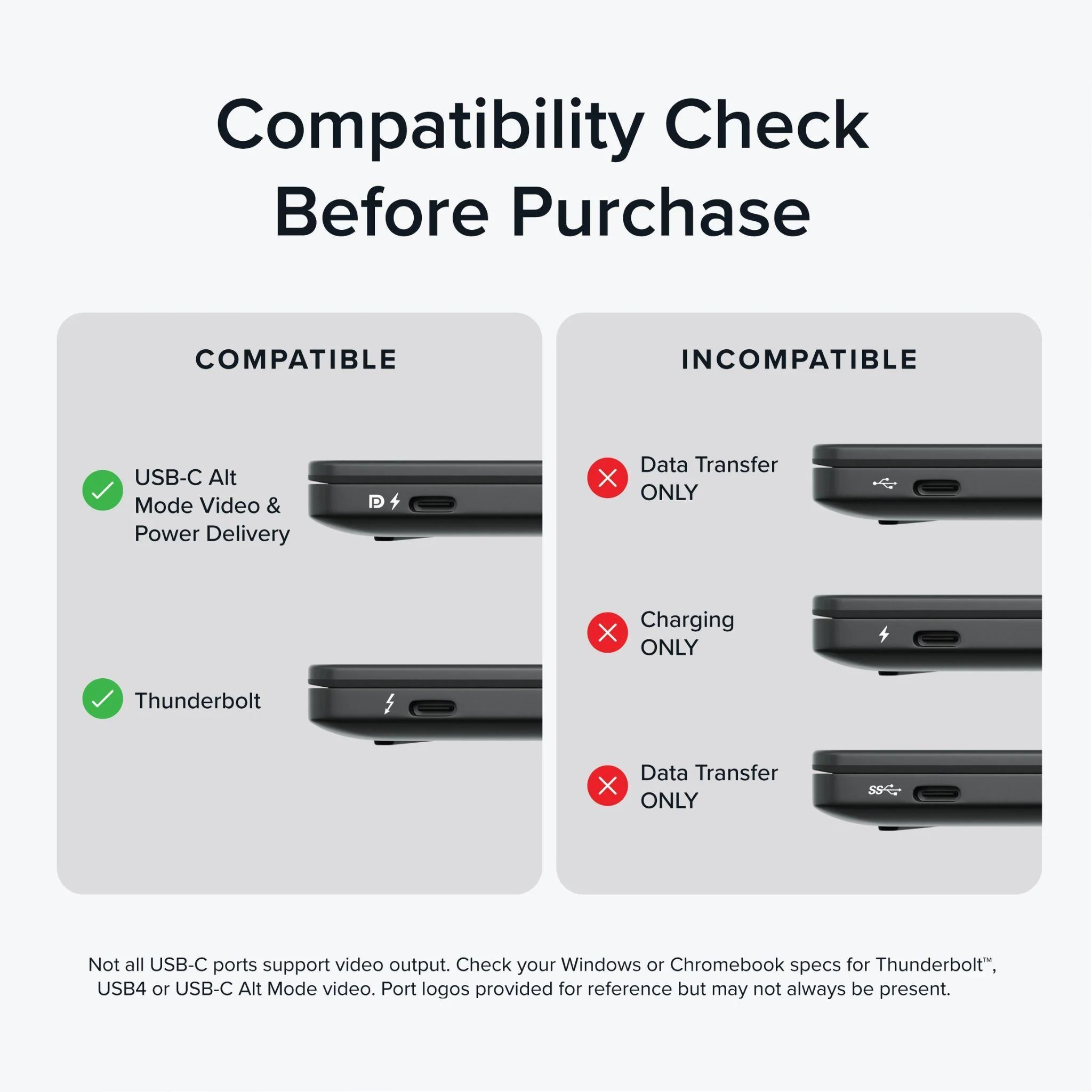
USB-C video requirement (important): This monitor requires a video-capable USB-C port on your device: USB-C DisplayPort Alt Mode (DP Alt Mode), USB4, or Thunderbolt. Charging-only or data-only USB-C ports will NOT output video and will show a black/no-signal screen. For best results, connect directly to your device’s USB-C/USB4/Thunderbolt port—USB-C ports on some hubs/docks may not pass DP Alt Mode video.
Not compatible with Nintendo Switch
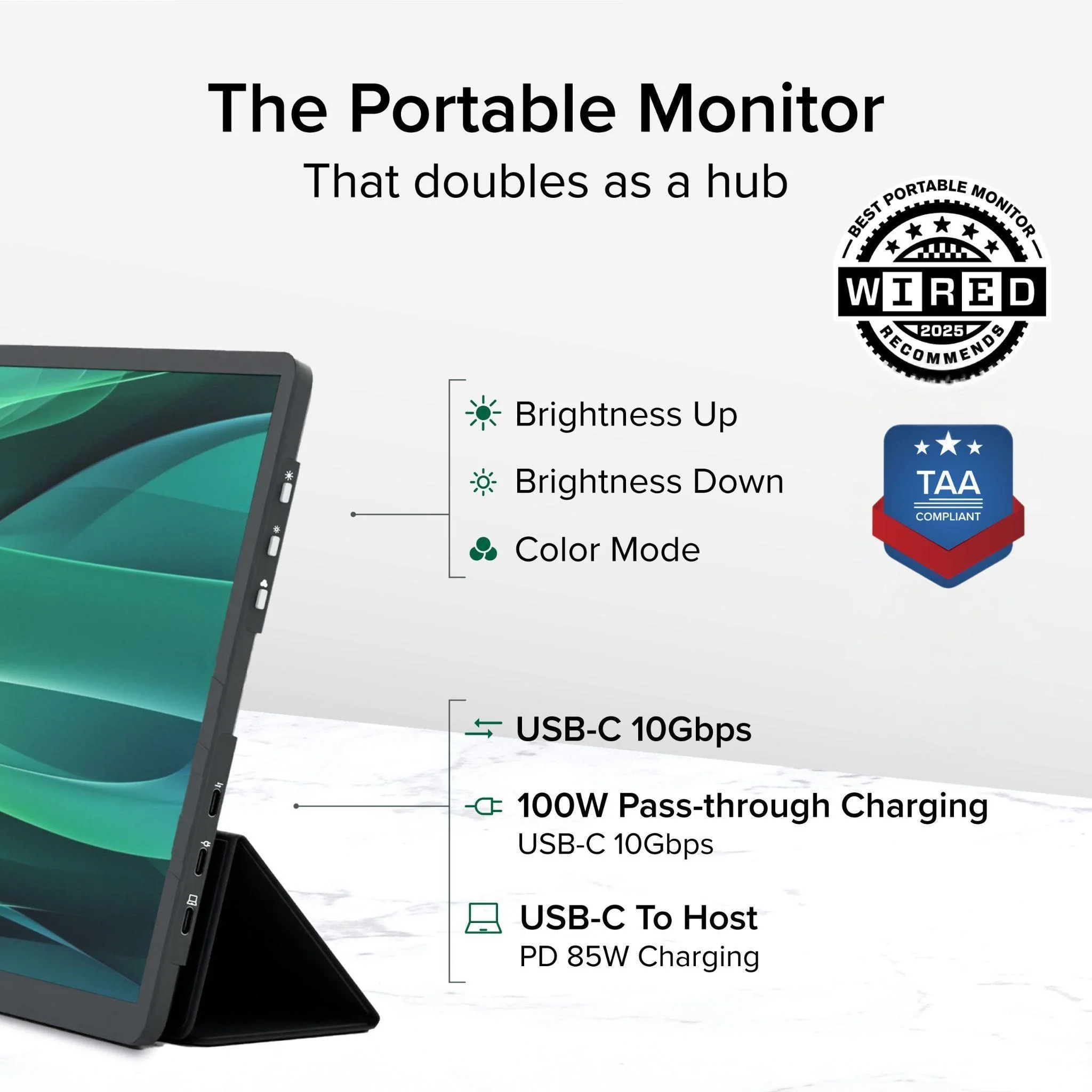
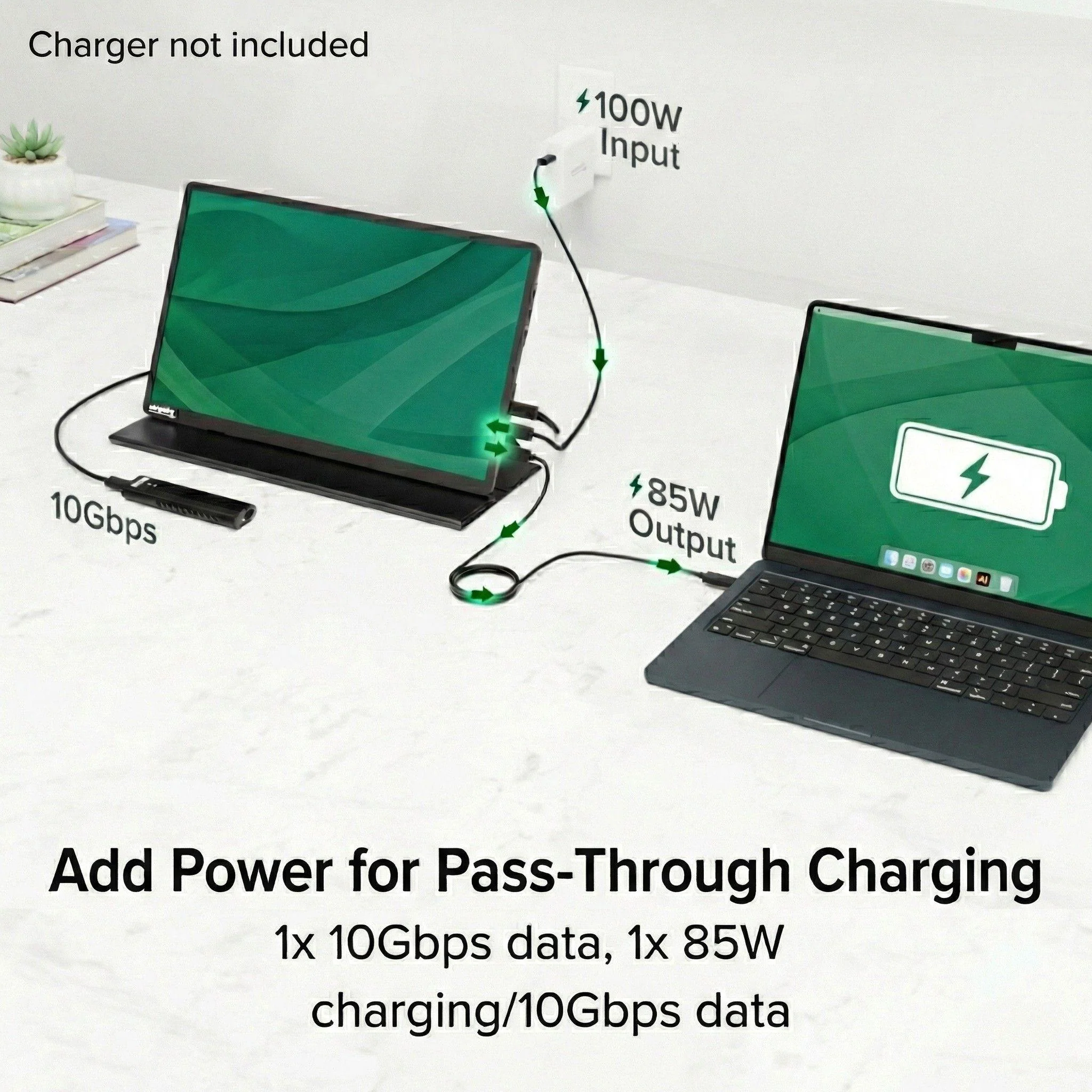
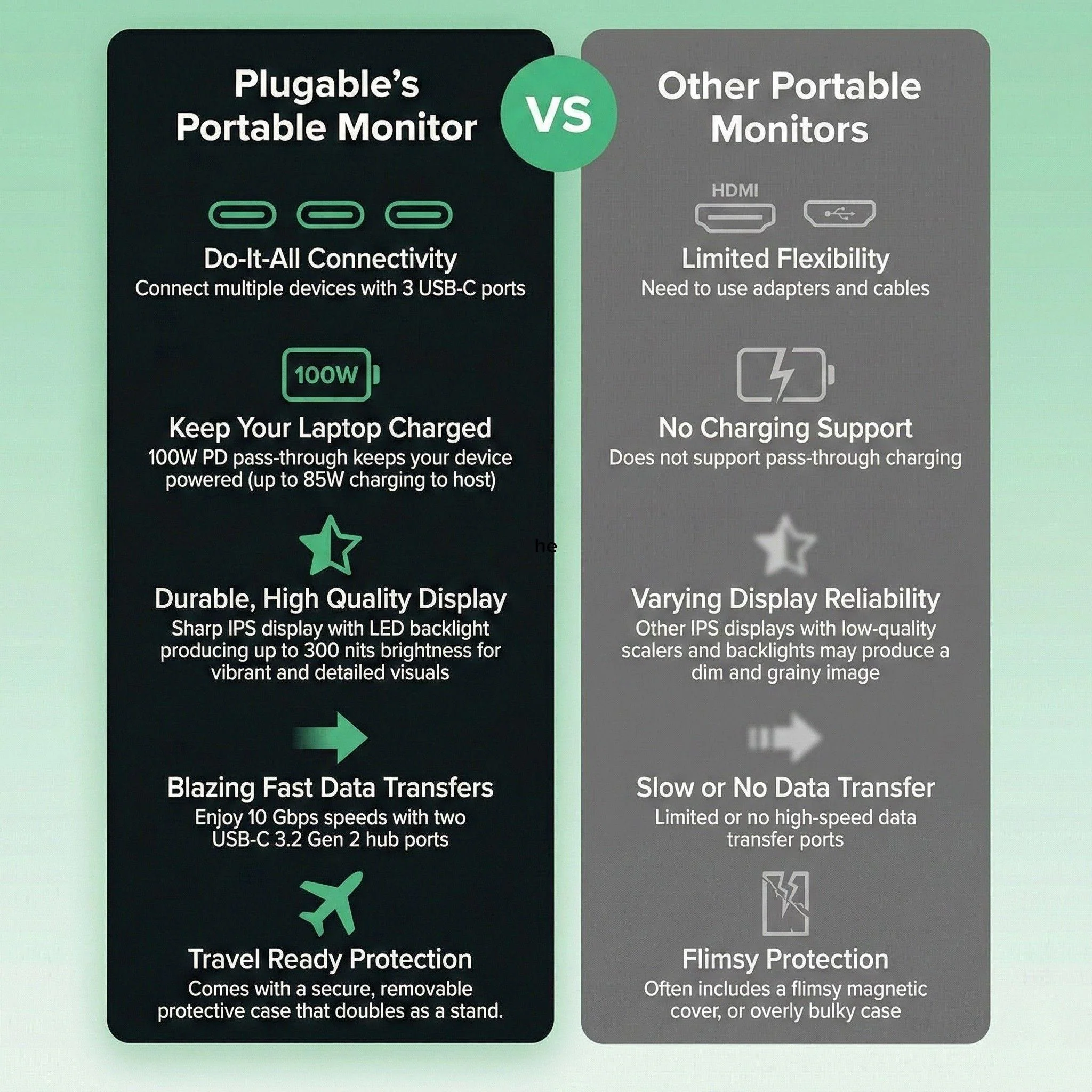
Power + pass-through charging: Many laptops can power the monitor over the same USB-C cable used for video. Phones/tablets may need extra power. Connect a USB-C power adapter (not included) to enable USB-C PD pass-through: powers the monitor and can charge your device (up to 100W PD input, up to 85W to host).
Cable guidance: Includes a 1.0 m (3.3 ft) USB-C cable that carries video/power with compatible hosts. If replacing/going longer, choose a cable that explicitly supports DP Alt Mode + Power Delivery + 10Gbps (or higher). Many identical-looking USB-C cables are charge-only and won’t carry video.
Brightness tips: Optimized for indoor productivity. If the display looks dim, adjust the monitor’s hardware brightness and color modes. Direct sunlight can reduce perceived brightness.
Protected streaming: Supports HDCP playback when your device/port/apps support HDCP output.
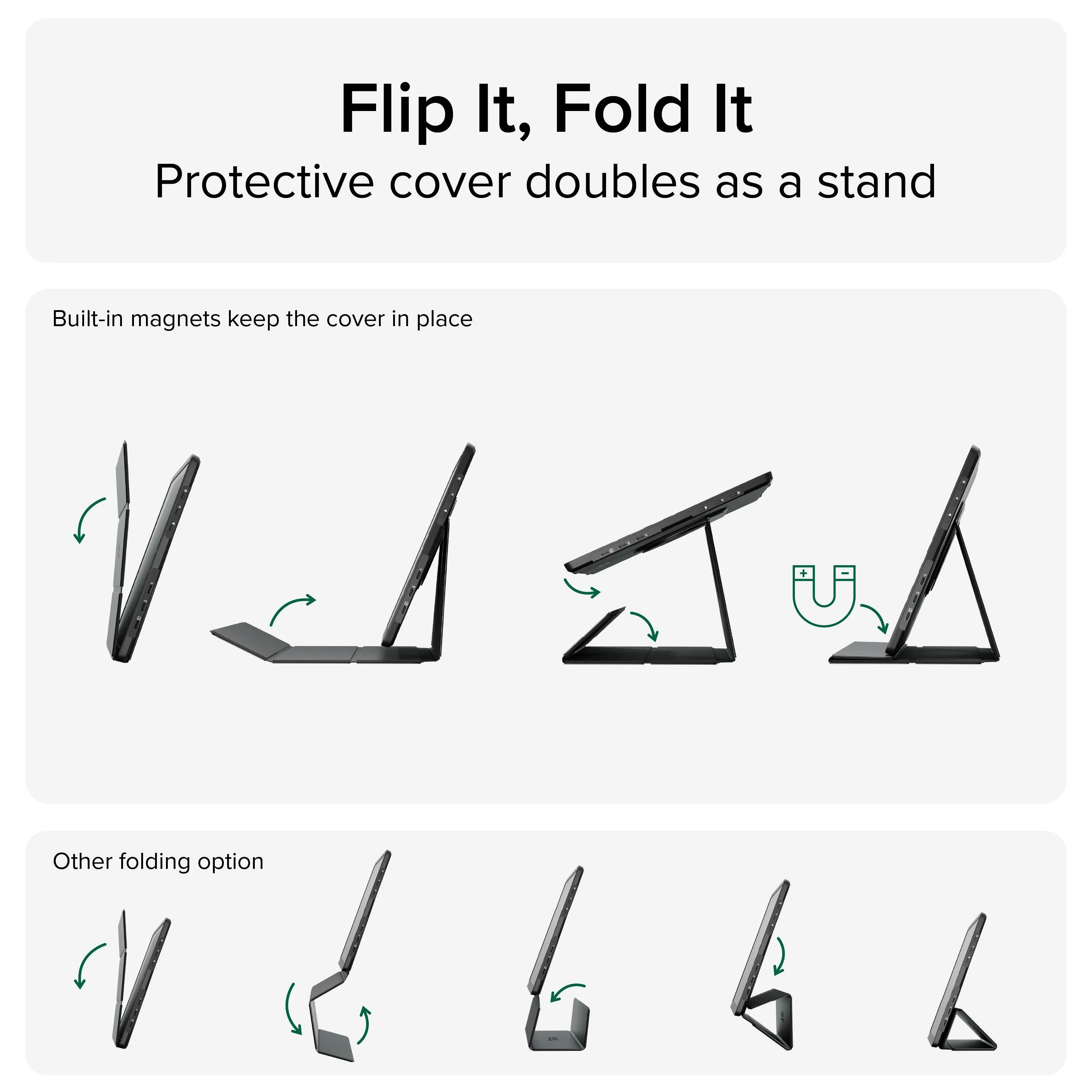
What’s included: the USBC-PDMON 15.6" portable monitor, folding travel cover/stand, USB-C to USB-C cable (1.0 m/3.3 ft), and a Quick Start Guide. Designed with reliability at its core for IT deployments and home offices, and backed by lifetime support from Plugable’s North American team of connectivity experts
USB-C video requirement (important): This monitor requires a video-capable USB-C port on your device: USB-C DisplayPort Alt Mode (DP Alt Mode), USB4, or Thunderbolt. Charging-only or data-only USB-C ports will NOT output video and will show a black/no-signal screen. For best results, connect directly to your device’s USB-C/USB4/Thunderbolt port—USB-C ports on some hubs/docks may not pass DP Alt Mode video.
Not compatible with Nintendo Switch
Power + pass-through charging: Many laptops can power the monitor over the same USB-C cable used for video. Phones/tablets may need extra power. Connect a USB-C power adapter (not included) to enable USB-C PD pass-through: powers the monitor and can charge your device (up to 100W PD input, up to 85W to host).
Cable guidance: Includes a 1.0 m (3.3 ft) USB-C cable that carries video/power with compatible hosts. If replacing/going longer, choose a cable that explicitly supports DP Alt Mode + Power Delivery + 10Gbps (or higher). Many identical-looking USB-C cables are charge-only and won’t carry video.
Brightness tips: Optimized for indoor productivity. If the display looks dim, adjust the monitor’s hardware brightness and color modes. Direct sunlight can reduce perceived brightness.
Protected streaming: Supports HDCP playback when your device/port/apps support HDCP output.
What’s included: the USBC-PDMON 15.6" portable monitor, folding travel cover/stand, USB-C to USB-C cable (1.0 m/3.3 ft), and a Quick Start Guide. Designed with reliability at its core for IT deployments and home offices, and backed by lifetime support from Plugable’s North American team of connectivity experts
Product Information
Product Information
Shipping & Returns
Shipping & Returns
Plugable USB-C Portable Monitor with Protective Case/Stand, 100W Pass-Through Charging
Plugable USB-C Portable Monitor with Protective Case/Stand, 100W Pass-Through Charging
The Plugable USBC-PDMON is a TAA-compliant USB-C portable monitor designed for everyday productivity in home offices, business travel, hot-desking, classrooms, and IT deployments. It’s built to add a second screen quickly without complicated setup so you can stay productive with email, spreadsheets, admin dashboards, presentations, and remote work anywhere
USB-C video requirement (important): This monitor requires a video-capable USB-C port on your device: USB-C DisplayPort Alt Mode (DP Alt Mode), USB4, or Thunderbolt. Charging-only or data-only USB-C ports will NOT output video and will show a black/no-signal screen. For best results, connect directly to your device’s USB-C/USB4/Thunderbolt port—USB-C ports on some hubs/docks may not pass DP Alt Mode video.
Not compatible with Nintendo Switch
Power + pass-through charging: Many laptops can power the monitor over the same USB-C cable used for video. Phones/tablets may need extra power. Connect a USB-C power adapter (not included) to enable USB-C PD pass-through: powers the monitor and can charge your device (up to 100W PD input, up to 85W to host).
Cable guidance: Includes a 1.0 m (3.3 ft) USB-C cable that carries video/power with compatible hosts. If replacing/going longer, choose a cable that explicitly supports DP Alt Mode + Power Delivery + 10Gbps (or higher). Many identical-looking USB-C cables are charge-only and won’t carry video.
Brightness tips: Optimized for indoor productivity. If the display looks dim, adjust the monitor’s hardware brightness and color modes. Direct sunlight can reduce perceived brightness.
Protected streaming: Supports HDCP playback when your device/port/apps support HDCP output.
What’s included: the USBC-PDMON 15.6" portable monitor, folding travel cover/stand, USB-C to USB-C cable (1.0 m/3.3 ft), and a Quick Start Guide. Designed with reliability at its core for IT deployments and home offices, and backed by lifetime support from Plugable’s North American team of connectivity experts
USB-C video requirement (important): This monitor requires a video-capable USB-C port on your device: USB-C DisplayPort Alt Mode (DP Alt Mode), USB4, or Thunderbolt. Charging-only or data-only USB-C ports will NOT output video and will show a black/no-signal screen. For best results, connect directly to your device’s USB-C/USB4/Thunderbolt port—USB-C ports on some hubs/docks may not pass DP Alt Mode video.
Not compatible with Nintendo Switch
Power + pass-through charging: Many laptops can power the monitor over the same USB-C cable used for video. Phones/tablets may need extra power. Connect a USB-C power adapter (not included) to enable USB-C PD pass-through: powers the monitor and can charge your device (up to 100W PD input, up to 85W to host).
Cable guidance: Includes a 1.0 m (3.3 ft) USB-C cable that carries video/power with compatible hosts. If replacing/going longer, choose a cable that explicitly supports DP Alt Mode + Power Delivery + 10Gbps (or higher). Many identical-looking USB-C cables are charge-only and won’t carry video.
Brightness tips: Optimized for indoor productivity. If the display looks dim, adjust the monitor’s hardware brightness and color modes. Direct sunlight can reduce perceived brightness.
Protected streaming: Supports HDCP playback when your device/port/apps support HDCP output.
What’s included: the USBC-PDMON 15.6" portable monitor, folding travel cover/stand, USB-C to USB-C cable (1.0 m/3.3 ft), and a Quick Start Guide. Designed with reliability at its core for IT deployments and home offices, and backed by lifetime support from Plugable’s North American team of connectivity experts
$71.98
Original: $239.95
-70%Plugable USB-C Portable Monitor with Protective Case/Stand, 100W Pass-Through Charging—
$239.95
$71.98Product Information
Product Information
Shipping & Returns
Shipping & Returns
Description
The Plugable USBC-PDMON is a TAA-compliant USB-C portable monitor designed for everyday productivity in home offices, business travel, hot-desking, classrooms, and IT deployments. It’s built to add a second screen quickly without complicated setup so you can stay productive with email, spreadsheets, admin dashboards, presentations, and remote work anywhere
USB-C video requirement (important): This monitor requires a video-capable USB-C port on your device: USB-C DisplayPort Alt Mode (DP Alt Mode), USB4, or Thunderbolt. Charging-only or data-only USB-C ports will NOT output video and will show a black/no-signal screen. For best results, connect directly to your device’s USB-C/USB4/Thunderbolt port—USB-C ports on some hubs/docks may not pass DP Alt Mode video.
Not compatible with Nintendo Switch
Power + pass-through charging: Many laptops can power the monitor over the same USB-C cable used for video. Phones/tablets may need extra power. Connect a USB-C power adapter (not included) to enable USB-C PD pass-through: powers the monitor and can charge your device (up to 100W PD input, up to 85W to host).
Cable guidance: Includes a 1.0 m (3.3 ft) USB-C cable that carries video/power with compatible hosts. If replacing/going longer, choose a cable that explicitly supports DP Alt Mode + Power Delivery + 10Gbps (or higher). Many identical-looking USB-C cables are charge-only and won’t carry video.
Brightness tips: Optimized for indoor productivity. If the display looks dim, adjust the monitor’s hardware brightness and color modes. Direct sunlight can reduce perceived brightness.
Protected streaming: Supports HDCP playback when your device/port/apps support HDCP output.
What’s included: the USBC-PDMON 15.6" portable monitor, folding travel cover/stand, USB-C to USB-C cable (1.0 m/3.3 ft), and a Quick Start Guide. Designed with reliability at its core for IT deployments and home offices, and backed by lifetime support from Plugable’s North American team of connectivity experts
USB-C video requirement (important): This monitor requires a video-capable USB-C port on your device: USB-C DisplayPort Alt Mode (DP Alt Mode), USB4, or Thunderbolt. Charging-only or data-only USB-C ports will NOT output video and will show a black/no-signal screen. For best results, connect directly to your device’s USB-C/USB4/Thunderbolt port—USB-C ports on some hubs/docks may not pass DP Alt Mode video.
Not compatible with Nintendo Switch
Power + pass-through charging: Many laptops can power the monitor over the same USB-C cable used for video. Phones/tablets may need extra power. Connect a USB-C power adapter (not included) to enable USB-C PD pass-through: powers the monitor and can charge your device (up to 100W PD input, up to 85W to host).
Cable guidance: Includes a 1.0 m (3.3 ft) USB-C cable that carries video/power with compatible hosts. If replacing/going longer, choose a cable that explicitly supports DP Alt Mode + Power Delivery + 10Gbps (or higher). Many identical-looking USB-C cables are charge-only and won’t carry video.
Brightness tips: Optimized for indoor productivity. If the display looks dim, adjust the monitor’s hardware brightness and color modes. Direct sunlight can reduce perceived brightness.
Protected streaming: Supports HDCP playback when your device/port/apps support HDCP output.
What’s included: the USBC-PDMON 15.6" portable monitor, folding travel cover/stand, USB-C to USB-C cable (1.0 m/3.3 ft), and a Quick Start Guide. Designed with reliability at its core for IT deployments and home offices, and backed by lifetime support from Plugable’s North American team of connectivity experts